018, GUI and Map

I’m marking this one as “in progress” as it’s on the cusp of being done, but needs a little more time. I don’t know when I’ll pick it back up again, so I thought I’d begin documenting it while it’s still fresh in my mind.

I’ve spent some time putting rudimentary GUI (graphical user interface) back into the project. I’ve currently got it so you have two GUI screens, one while controlling a vehicle, and one while on the map.

GUI is going to be kept as simple as possible; there’s a simple direction indicator to help you orientate when driving. It shows turret direction in relation to body direction, so you know roughly what direction you’re going to go in if you push forward. There’s also a crosshair that tracks the forward direction of the cannon; in other words, it shows where the shot will go if you fire at any given moment. As your camera turns faster than the turret, the centre of the screen isn’t always the direction the round will go. This indicator shows, and will also show if something is going to clip the show (in future).

Also, I have the map working again. You can pop out to a birds eye view at any time, with camera panning and zooming as you’d expect. You can hover over a friendly unit, and at the press of a button, take control of it. This “hot swap” feature is something I wanted to add in a while ago, and has been working for a while, but now it’s back to being functional.

I ended up reworking a lot of this code, as it was originally a bit too rigid. I broke it into components, again, and organised a proper flow of data (always flowing down from the top). It’s honestly a much better and more understandable approach, I’m really glad I was told about it.

Images and videos to follow when it’s complete.
017, Pillbox and Artillery

Switching to smaller, re-usable components instead of long, bespoke scripts required a fair amount of work, but it was worth it. I was able to create two new variations of the static turret with ease as a result, and I can see it being incredibly useful in the future for quickly prototyping and iterating on new variations.

Addition #1 is the Pillbox; a machine-gun bunker that has a limited vision arc and field of fire. It’s vision and firing arc is entirely defined by the collision of the building it’s in, so I don’t need to fiddle with values if I change the building. It’s pretty future-proof. It has a new projectile type, and fires in bursts, with some hefty spread currently.

The Pillbox can’t currently hurt a tank, but the future plan is that when under machine-gun fire, you won’t be able to poke your head out of the tank, so will be restricted to the much more limited interior viewports. Pillboxes therefore serve more as a debuff than a threat, taking away your vision and potentially blinding you to greater threats.

Addition #2 is the Artillery gun. It’s very similar to the standard anti-tank gun, but has some noticable differences. It turns slowly, and is inaccurate, saturating the area around its target with deadly explosive shells. It is intended to force a player to keep moving to avoid the rain; punishing players who stay still, and encouraging them to rush the weapon in order to silence it.

Originally, I was going to implement some complicated parabolic arc calculations to get the weapon to properly align and “lob” shells, but in the end I decided against that. Instead, it spawns it’s projectile above the target, and rains it down on them. It still plays a fire animation, but for now, it’s not doing any expensive or complicated calculations.

I’ll need to figure out a good parabolic arc calculation for the AI tank, so I may return and rework this at that juncture. For now, I just wanted something working, and it’s effective.

Mini-Update; Debugging Hit Detection

I noticed hit detection was a little scrambled, and since it’s a huge part of the game, I decided to spend today digging into why. It’s been a frustrating, but educational experience.

I’m noticing more and more that code I wrote towards the start of the year tends to be garbage. To be expected, given I’d just started learning C#. Basically, as soon as a round struck an armour plate, it was immediately jolting ~25° clockwise, throwing off any actual damage calculation. I ripped that code out, and put in some much simpler logic, using the actual physics rather than a hack-y workaround.

If a round is supposed to pierce, it basically freezes in place when it strikes, allowing the damage calculation to be done properly without pollution. It’s then removed. If it doesn’t pierce, it either explodes without causing damage (absorbed) or ricochets off (deflected), depending on the angle.

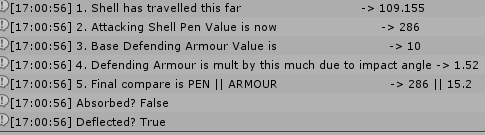
Unfortunately, I’ve now discovered another weird little bug. As you can see in the screenshot above, I flicked on my verbose debug output for the projectile. It’s running the right logic; the round is decaying in penetration strength because of how far it’s travelled, it’s figuring out how much the angle of the defending armour is affecting effective armour, and then comparing the two. But, bizarrely, it’s thinking 15 is more than 286.

EDIT: I got to the bottom of it. The logic for angle of impact was overriding everything, so even when a shot definitely should penetrate, if it was at too parallel an angle, it was just deflecting, making even rear shots at an angle impossible. I re-ordered the checks, and increased the threshold a little. Angle of impact now determines whether a non-penetrating shot bounces or is absorbed.

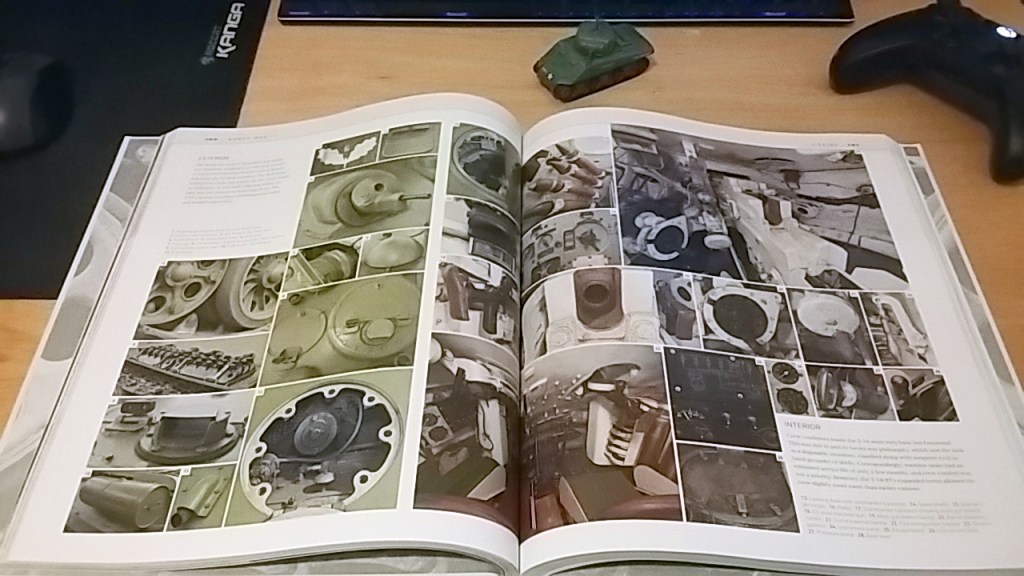
On a different note, I got this really cool book for Christmas, from The Tank Museum in Bovington. It’s creatively called “The Tank Book”. Bovington is a really fantastic place, and if you’re ever in the UK I really recommend checking it out.

I was there last year, and saw the last living Tiger I tank – Tiger 131 – in action. I also saw a number of other vehicles, including the real M4A2E8 Sherman from the film “Fury” which was a hugely cool thing. They have a ton of vehicles, including a British WWI Mark V tank, a German WWI A7V, a whole heap of T-series Soviet tanks, and just a warehouse full of conventional and unusual vehicles.

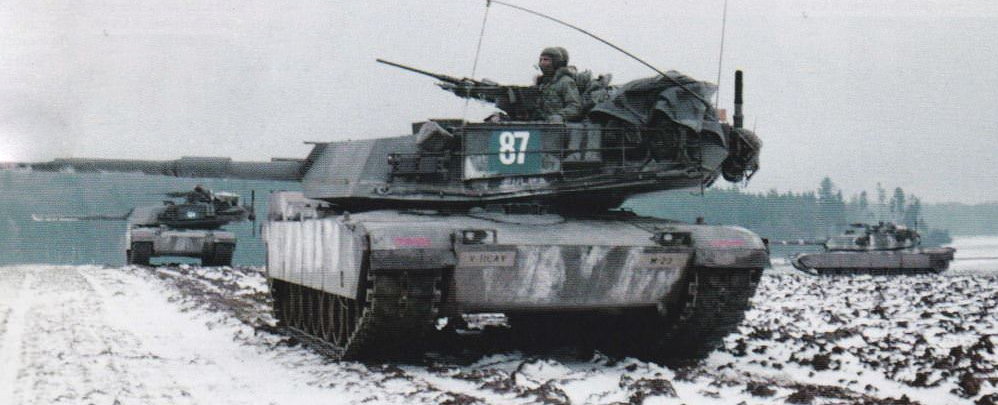
I’ve yet to sit and flick through it, but I noticed a lot of really useful interior reference. Always good to ground your designs in the real thing; form follows function, after all!

016, (Early) Cinematic Kill-shot Camera

Finally, we are up to date with the update videos! This is the most recent update, assembled today, as this very website itself was being put together!

I used Panzer Front as an outline for what Parabellum should be, but I wanted to add in unique elements to help Parabellum feel like it’s own game, and to make it a bit more engaging for people who perhaps aren’t as interested in tanks as me.

As part of this, I had planned to introduce a very simple cinematic event system, that would trigger on key events and add a bit of flair to the proceedings. There was an element of this in Panzer Front, but it was a very simple camera zoom when a vehicle was destroyed, without much cinematic flair.

I took inspiration from a few sources; films, naturally, but also Fallout 3‘s “VATS” system, and Sniper Elite‘s slow-motion kill camera.

The idea is, when the game determines you’re about to fire a shot that will cause an enemy’s destruction, it triggers this short sequence. The lengths of each segment, in addition to the cameras themselves, are all configurable. It manually handles the firing of the cannon, and the death of the enemy vehicle, so as to prevent any edge-cases that will ruin the effect.

I like the angle used for firing, but I’m less happy with the final angle. I’m tempted to point the final camera back towards the player vehicle, so you get a sense of space and scale, and so you understand spacially what you’re looking at.

This isn’t a priority feature, though, so it’s going on the backburner for a while now it’s proven out.

014, The Tactician

Update #14 was fairly critical for the project. Introducing the tactical map, it began to flesh out the concept of Parabellum as a tactical action game, rather than a pure tank simulator.

The first part of this was the ability to zoom out to a map level view, and issue orders to friendly vehicles. In this early stage, this only means move orders, but it’s a groundwork.

The second part is the ability to directly control any friendly vehicle, which was introduced for a number of reasons.

It’s a feature I’ve only really seen used to any effect in Battlefield 2: Modern Combat. In that game, “hot swapping” as it’s called, is used to allow the player to experience several different perspectives and roles in any given battle. I thought it was a really cool way of making combined arms warfare accessible and fluid, and I’m surprised it hasn’t been used more since that game.

It allows the player to always stay where the action is. It also makes protecting friendlies important; they are essentially your extra “lives”, should your tank be knocked-out. Hopefully, it will lead to players being more considerate with their orders, as reckless direction will handicap the player.

013, AI Battles

This was the very first iteration of a mobile enemy AI, and it’s ability to detect and assign targets. This system would later be ripped out and completely overhauled, but this is it’s humble beginnings.

Interestingly, before this, I had toyed with the idea of only having static enemies, but shyed away from it as I felt it would quickly become very easy to cheese, and not very fun to play.

012, Basic AI

This update introduced a rudimentary mobile enemy AI to the game. It was rough, and the whole system would be overhauled later, but it outlined a basic promise of a more mobile kind of game, convincing me that turrets and bunkers would not be the main kind of enemy, but more of a support.

010, Objective State

As part of a push to introduce more of a game to the project, I programmed in a simple victory/defeat state, based on the destruction of the player or the enemy turrets.

Design a site like this with WordPress.com
Get started